How to Create 3D Models From ANY Image with AI — The Future of Digital Design
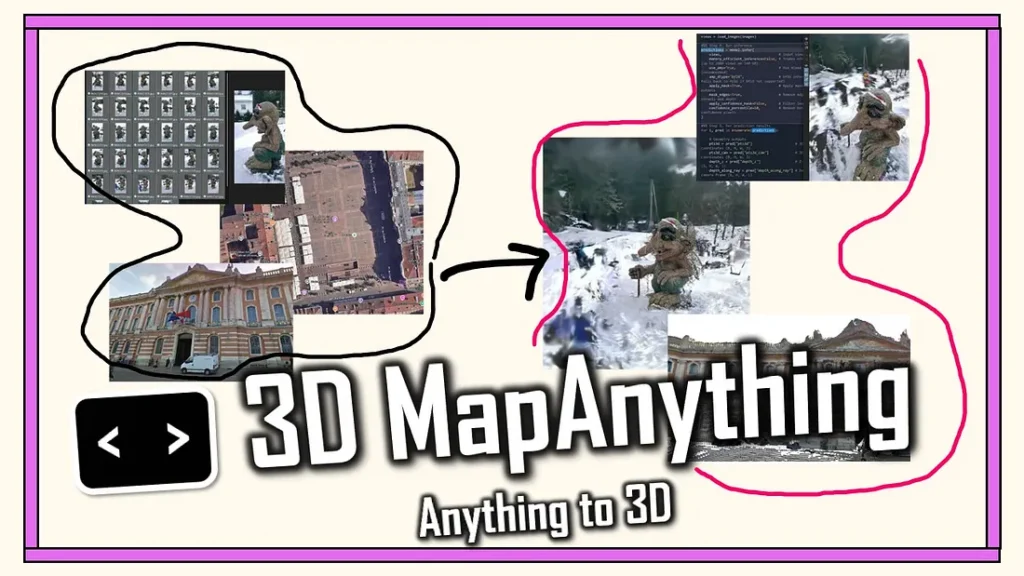
Imagine snapping a photo of a sneaker, a chair, or even your dog — and within seconds, having a fully textured 3D model you can rotate, render, and drop into a game or AR scene.
That’s no longer sci-fi. Thanks to artificial intelligence, learning how to create 3D models from any image with AI is now simpler, faster, and more accessible than ever.
Whether you’re a designer, game developer, or hobbyist, AI tools are rewriting the rules of 3D creation.
What Does It Mean to Create 3D Models From Any Image with AI?
Traditionally, creating 3D models required complex software like Blender, Maya, or ZBrush — and years of experience. Artists had to manually sculpt, texture, and rig each asset.
But now, AI can do the heavy lifting. Modern 3D AI tools analyze a 2D image — say, a photo of a car — and generate a detailed 3D mesh complete with realistic textures and depth.
This process is called image-to-3D reconstruction, and it’s powered by neural radiance fields (NeRFs) and diffusion models — the same AI magic behind tools like Stable Diffusion and Midjourney.
In short: you provide the picture, and AI does the modeling.
Top Tools for Creating 3D Models with AI
Here are some of the most powerful and easy-to-use platforms that let you create 3D models from any image using AI:
1. Luma AI
Luma AI lets you upload simple photos or videos from your phone, and it uses NeRF technology to generate photorealistic 3D scenes. You can even export your model for AR/VR or game engines like Unity and Unreal.
2. Meshy AI
Meshy AI converts text or image prompts into detailed 3D assets. You can fine-tune materials, lighting, and structure — perfect for product designers or NFT creators.
3. Kaedim
Kaedim turns 2D concept art into production-ready 3D models in minutes. Used by gaming studios, it’s designed to save hours of manual modeling work.
4. OpenAI’s Shap-E
Shap-E is OpenAI’s open-source model that generates 3D objects from text or images. Developers love it for its flexibility and realism in object rendering.
Each of these tools removes the technical barriers and allows creators to focus on creativity, not complexity.
AI vs. Traditional 3D Modeling — A Game-Changer
| Feature | Traditional 3D Modeling | AI-Powered 3D Creation |
| Time Required | Hours to days | Minutes |
| Skill Level | Expert | Beginner-friendly |
| Tools Needed | Complex software | Web-based apps |
| Output Quality | Depends on artist | Consistent & realistic |
| Accessibility | Limited | Open to everyone |
With AI, 3D creation is democratized — you no longer need to be a professional modeler to produce game-ready assets.
Real-World Use Cases for AI 3D Modeling
1. Game Development
Indie developers can generate environments, props, and characters in record time, reducing production costs dramatically.
2. E-Commerce
Retailers use AI-generated 3D models to create interactive product previews for websites and AR shopping experiences.
3. Film & Animation
AI speeds up pre-visualization and prop design, allowing studios to test concepts before full-scale modeling.
4. Architecture & Design
Architects and designers can transform sketches or reference photos into 3D walkthroughs within minutes.
5. Education & Research
Students learning 3D design now have instant access to ready-made assets for experimentation and learning.
Step-by-Step: How to Create 3D Models From Any Image with AI
If you’re just starting, here’s a simple workflow:
- Choose a clear image — preferably with good lighting and visible angles.
- Upload to an AI tool (like Luma AI or Meshy).
- Adjust parameters — scale, texture, or background if the tool allows.
- Generate your 3D model and wait for rendering.
- Export your model in formats like
.glb,.obj, or.fbx. - Refine if needed using Blender or Unity for polish.
In under 10 minutes, you can have a fully rendered 3D asset ready to use.
Pro Tips for Better AI 3D Results
✅ Use high-resolution images with minimal background noise.
✅ Capture multiple angles for more accurate modeling.
✅ Combine tools — use Meshy for generation, Blender for cleanup.
✅ Don’t forget lighting and texturing; AI can get close, but manual tweaks elevate quality.
✅ Save your renders in multiple formats for versatility.
The Benefits of AI-Driven 3D Modeling
- Speed: Save hours or even days of manual work.
- Creativity Boost: Experiment freely without worrying about technical limits.
- Accessibility: Anyone with a photo and an idea can create.
- Scalability: Great for teams building large asset libraries.
- Cost-Efficiency: Reduces need for big modeling teams or software licenses.
AI isn’t replacing artists — it’s empowering them to create more in less time.
Conclusion: The Future of 3D Is Just an Image Away
Learning how to create 3D models from any image with AI isn’t just a skill — it’s an entry ticket into the future of digital creativity.
In 2026 and beyond, those who can merge imagination with AI will define how we see, build, and experience the digital world.
So here’s the question:
If you could turn any picture into a 3D world — what would you create first?